

Key Takeaways
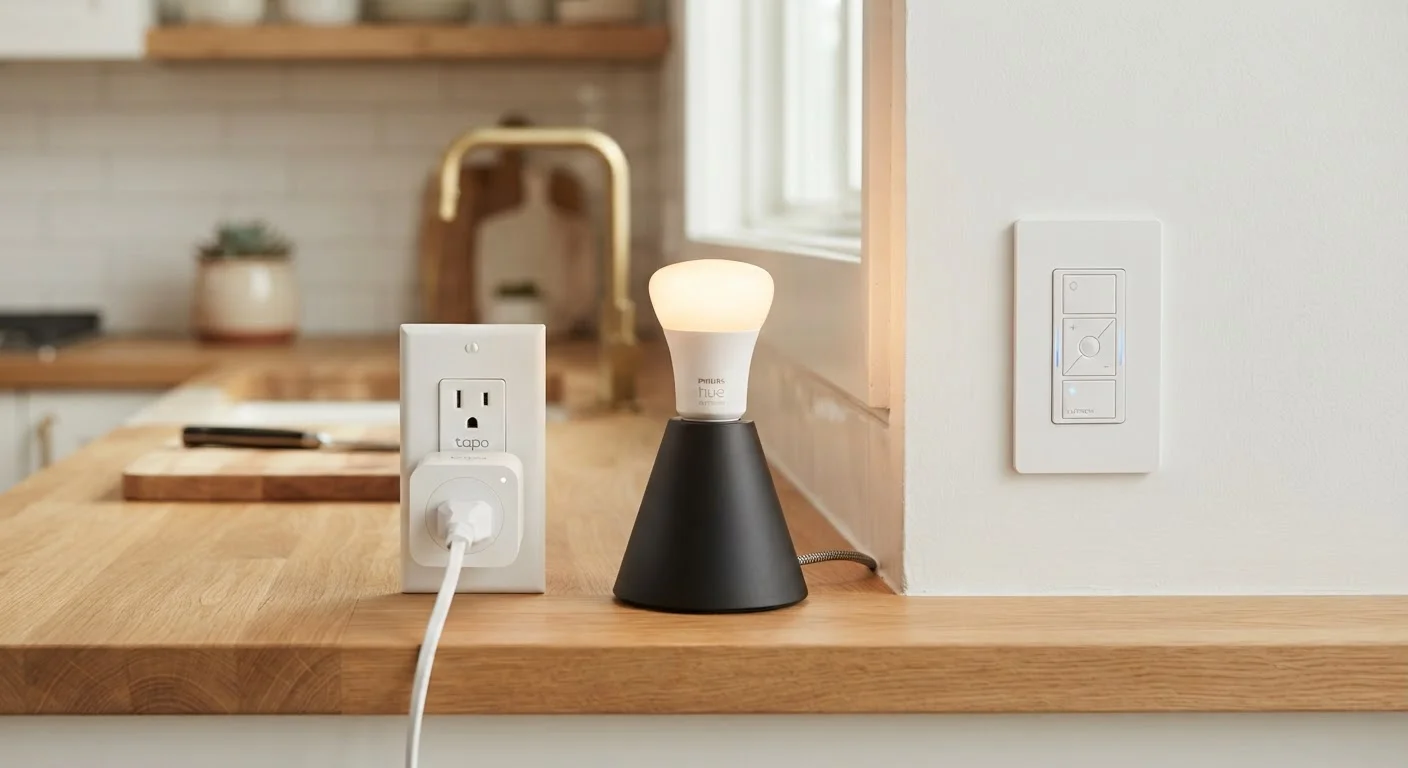
- Smart plugs control power to any device plugged into them; they don't communicate with the device itself.
- Smart bulbs offer the richest lighting features but depend on the physical switch staying on.
- Smart switches replace wall switches and work with ordinary bulbs, making them the most permanent solution.
- Each option has trade-offs in cost, installation complexity, and flexibility.
- Choosing the wrong type for your situation is one of the most common smart home frustrations.
Our Verdict
Smart plugs are the easiest starting point for non-lighting devices or lamps. Smart bulbs deliver the most lighting customization but require behavioral adjustment from everyone in the household. Smart switches are the most seamless long-term solution but involve more upfront effort. No single option wins outright — the right choice depends on what you're controlling and how much disruption you're willing to accept.
| Best for | Recommended |
|---|---|
| Renters or those wanting zero-installation smart control | Smart Plugs |
| Those who want color, dimming, and scheduling on a specific lamp or fixture | Smart Bulbs |
| Homeowners replacing overhead light switches for whole-room control | Smart Switches |
Why This Choice Matters More Than It Seems
When people start building a smart home, they often grab whichever device looks familiar — a smart bulb at the hardware store, or a plug-in adapter they saw online. But smart plugs, smart bulbs, and smart switches are genuinely different tools, and picking the wrong one for a situation leads to the exact frustrations that make people abandon smart home setups altogether.
Understanding how each device works — not just what it does — makes the difference between a home that runs smoothly and one that requires constant workarounds. This is especially relevant if you're exploring the ideas covered in common smart home myths that trip up new owners.
| Smart Plug | Smart Bulb | Smart Switch | |
|---|---|---|---|
| Installation effort | None — plug in and connect | Screw in, connect to app | Requires wiring; moderate effort |
| Works with existing bulbs | Yes | Replaces the bulb | Yes |
| Dimming / color control | No | Yes (model dependent) | Dimming only, no color |
| Affected by wall switch | No | Yes — loses connection if switched off | Switch IS the smart device |
| Best for | Lamps, appliances, fans | Color and ambiance lighting | Overhead, multi-person-use lighting |
| Renter friendly | Yes | Generally yes | No — modifies wiring |
| Typical per-unit cost | Low to moderate | Moderate | Moderate to higher |
Smart Plugs: Control the Power, Not the Device
A smart plug sits between a wall outlet and whatever you've plugged into it. When you tell it to turn off, it cuts power entirely — it doesn't send instructions to the device. That distinction matters more than it sounds.
Smart plugs work well with floor lamps, space heaters, fans, and small appliances. They're particularly useful for devices that don't have their own scheduling features. However, they have a hard ceiling: they can only switch power on or off. A smart plug cannot dim a lamp, change a light's color, or adjust a fan's speed.
Installation is effortless — plug it in and connect it to an app. That makes smart plugs ideal for renters or anyone hesitant to modify their home. The main limitation is that they're invisible to the device on the other end. If your coffee maker requires you to press a button after it powers on, a smart plug won't help you automate that step.
Test Before Committing to a Full Room
Before buying smart plugs, bulbs, or switches for every outlet or fixture in a room, start with one. Live with it for a week and note what works and what frustrates you. Small irritations — like a switch being in the wrong place or a bulb dropping offline — become much bigger problems at scale.
Smart Bulbs: Rich Features With One Critical Dependency
Smart bulbs screw into a standard lamp socket and connect to your Wi-Fi or a hub directly. They're where most of the advanced lighting features live: dimming, color temperature adjustment, color changes, and granular scheduling. For anyone building a full lighting system, smart bulbs offer the most control per fixture.
The catch is significant: a smart bulb needs constant power to stay connected. The moment someone flips the physical wall switch off, the bulb loses its network connection and can't respond to app commands or automations until power is restored manually. In households where people habitually use wall switches, this becomes a constant source of friction.
Some households solve this by labeling switches or installing switch guards — covers that prevent the switch from being flipped. Others replace the wall switch with a smart switch specifically designed to work alongside smart bulbs without cutting their power. If you're planning a full room setup, the first smart lighting system guide covers how to structure these decisions from the start.
Smart Switches: The Most Seamless, Most Involved Option
A smart switch replaces the physical wall switch in your home and works with ordinary, non-smart bulbs. Because the intelligence lives in the switch rather than the bulb, anyone in the household can use the switch normally — pressing it like always — while you retain full app and voice control.
This makes smart switches the most natural fit for overhead lighting that multiple people use. There's no dependency on a bulb maintaining network connectivity, and no need to train the household to avoid certain switches.
The trade-off is installation. Replacing a wall switch requires turning off the circuit breaker, working with wiring, and ensuring your switch box has a neutral wire — which older homes sometimes lack. This is a task many homeowners can learn, but it's not plug-and-play, and anyone uncomfortable with electrical work should have a licensed electrician handle it. Smart switches also typically cost more per unit than bulbs or plugs, though they control all bulbs in a fixture rather than just one.
For those thinking through how devices like these fit into a broader system, understanding automations and scenes is a useful next step.
~$20–$60
Typical smart switch installation cost (DIY vs. electrician)
Costs vary widely based on switch model and whether professional installation is needed for homes without neutral wires.
1 switch
Smart switch controls all bulbs in a fixture
Unlike smart bulbs, which require one unit per socket, a single smart switch can control a multi-bulb overhead fixture at once.
Mixing and Matching: What Works Together
Most homes end up using more than one type. A smart plug might control a bedside lamp, smart bulbs might live in a color-accent fixture, and smart switches might handle the main overhead lights throughout the house. There's no rule against combining them — the key is being intentional about which tool fits which job.
One pairing to avoid: smart bulbs on a circuit controlled by a smart switch that cuts power. If the switch cuts power to the bulb, the bulb drops offline just as it would with a regular switch. Some smart switch models are specifically designed to send a signal rather than cut power, preserving bulb connectivity — but this requires checking compatibility before purchasing.
If you're wondering whether you also need a central hub to tie everything together, the case for and against smart home hubs lays out the trade-offs clearly. And if you're thinking longer term about building a reliable setup, it's worth reading about why smart home setups fall apart before committing to a particular approach.